
Notes: Home Page
Couldn't use the wide banner in the header as it appeared too small. This one is the logo we use on the Hi Vis jackets
Dae - Lets see if we can put together a new image for the top banner, this looks small on mobiles and needs a bit more Saturn to look right.The starfield background is a video. It can be removed easily
Dae - I like this, it adds a little motion without being overwhelming. No problems here.All the other text is a copy from current website
Dae - That makes senseText animated with "Slide" - "Fade" and "Scale" are two more options or none at all
Dae - Again, I like this, subtle and adds a bit of motion to make the page feel modern.More notes further down the page
Dae - Until they got moved into the "Notes" page :)The buttons display awkwardly on the mobile version. Perhaps repositioning would help. Also, some inconsistency in appearance although you can manually re-arrange the mobile version without affecting the desktop version
Dae - I've moved them around and made them slightly wider, both in Desktop and Mobile view. This seems to help a little.Tables sorted - see upcoming meetings
Dae - I've tried to restyle thiis a little to match the fonts, but Hostinger won't let me update the embed code. I'll send over the code and screenshot in email. I've also done a quick "3 event" section just to think about another way of doing it that works better on mobile. I'm not 100% convinced by it so tweaking the table might be the way.Photos easy to upload and display as a Gallery
Dae - Excellent, this is what we need.Doesn't work well on the mobile preview so some redesign of layout may be necessary - especially the wide banner and table - and these notes!
Dae - Most of the layout is working, good to know mobile can be tweaked as needed without impacting the desktop site.
Notes: Events
Coloured background
Playing with shapes
I would think it reasonable to put the extra events that occur throughout the year on this page - events such as MTDW, Schools, public events etc
Notes: Astrophotography
The Hostinger slide show looks good but it seems impossible to alter the width or add captions
The slideshows at the bottom is one imported from Canva which generates the code and is inserted as an element. There is a second slide show "A slide show from Canva" which provides some good sample pages to use as templates for club members' photos. A sound track can be added in Canva but it doesn't get transported into the code - I don't think that is a bad thing as I found it irritating! Also, I haven't found a way of making it Autoplay or loop but again, I don't think that is of great importance. It is great how it can be made full screen and zoomable though
Dae - I agree about the music, the built-in gallery is a bit too simple isn't it. Having something that allows a bit of text/description is important, so I think the Canva embeded ones look better, shame I can't edit them using my account.9/8 I have sent a message to Canva complaining that their requirements for a free account needing to be registered with the Charities Commission penalises small clubs like ours who meet all the requirements for an non incorporated group (Constitution, Committee, Teasurer, AGM etc) without the requirement to register as a charity to whom Canva give free access.
9/8 I am experimenting with Genially which seems to do presentations.
13/8 Got a refusal from Canva for free access so we can park that for the moment.
14/8 Made photo slide shows for Kevan and Steve using Genially
With the Website Builder we can only nest pages to one level so used buttons to link Kevan and Steve's slideshows to pages which are not in the Navigation. The option to exclude them can be switched on/off
Notes: Resources:
Most of this page is just how the AI creator made it.
Dan's HTML Table
Buttons
Just use the ones provided - no need for anything fancy
Looks like Genially is pretty good for our needs.
Log in - Name: Chair P/W our usual one Her***!*
email: web@hertsastro etc
It can produce some fancy presentations and I think their free allocation of storage is enough for what we need at the moment. We get 2Gb and have used about 250Mb to date (November 2025)
Very easy to import into Hostinger using a page that is Hidden from Navigation and pasting the code onto the blank page linked by a button from the appropriate section.
To export the code from Genially go to Share / Insert / Copy the iframe code
One annoying feature of the free version is that once the project is uploaded any photos that were uploaded for the project are "forgotten" and have to be reuploaded if you want to change them later. Not a huge problem more of a nuisance.
This form was originally in the footer but doesn't seem to do anything useful.
Test area for Inventory/Club Assets
HAG currently has these assets many of which can be borrowed by club members. On each item description there is a "Request to Borrow" button which you can use if you would like to borrow any equipment.
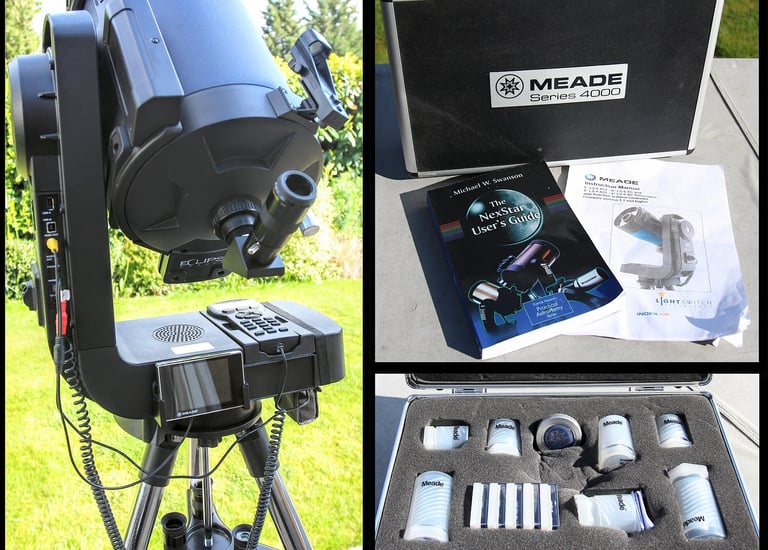
Meade 8" Lightswitch Telescope set
Condition: Good
Storage: Club Shed
Owner: Club
Purchased: Donated
Currently at: John Fraser
Inspection Due: January
*******************
Explore
Join our astronomy club for monthly meetings.
Connect
Learn
© 2026. All rights reserved.